
Friends who are website administrators, you've probably all encountered web Trojans and website backdoors, right?
Among them, the most well-known is the "one-liner Trojan" As its name suggests, it's extremely concise, truly consisting of just one line (as shown in the image below), and is usually embedded within the normal code of a website, making it difficult to detect.

(Figure 1: One-Liner Trojan)
When hackers infiltrate a server, they often start by compromising a website, implanting a Trojan backdoor, and then using that backdoor to further steal server permissions. Hackers mainly implant Trojan backdoors through the following methods: online upload vulnerabilities, FTP information leaks, and cross-site attacks. Among these, online upload vulnerabilities are the most commonly used method, accounting for over 90%.
So, how can we prevent hackers from uploading Trojan backdoors?
Deleting the online upload module? That would certainly be the most thorough solution. Without the online upload functionality, the chances of a Trojan backdoor being implanted are almost zero. However, this approach would affect the daily management of the website, making it not the best option.
In fact, preventing Trojan backdoors is quite simple. Just follow these two steps:
Restrict online upload functionality at the physical level, allowing only administrators to use it.
Restrict the upload of dynamic script files such as PHP, ASP, and ASP.net at the physical level.
I. Restrict online upload functionality at the physical level, allowing only administrators to use it.
The term "physical level" is used because some administrators mistakenly believe that restricting online upload functionality through the backend is sufficient. This is a grave mistake. Hackers exploit online upload vulnerabilities to infiltrate, so even if the online upload functionality is disabled in the backend management, it has no effect on them.
To restrict at the physical level, an additional layer of protection needs to be added outside the website. Uploaded files are generally stored in the backend directory. We can use the "Website Admin-Panel Protection" module of the "MagiAegis Defense System" to implement restrictions (as shown in the image below).
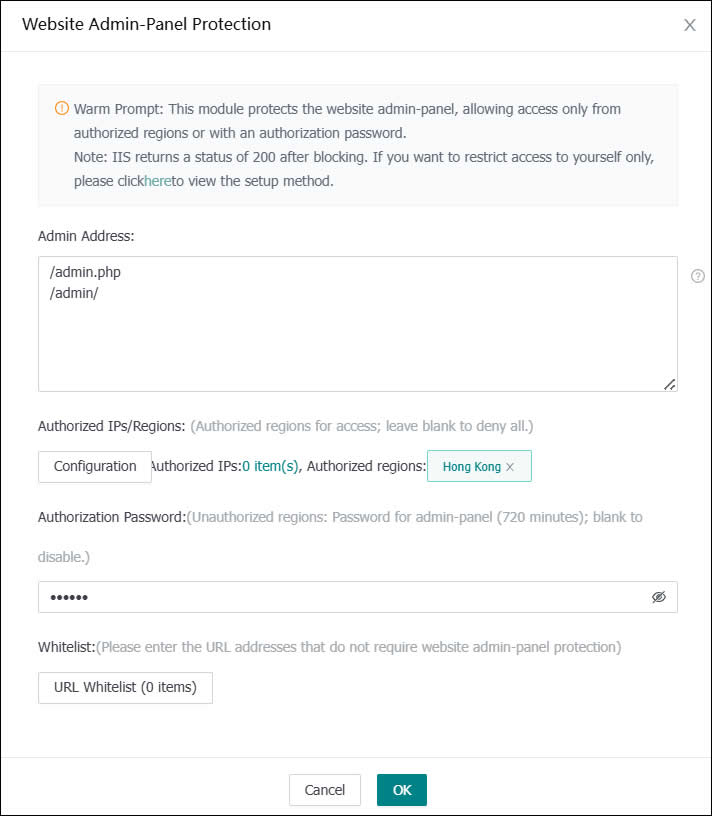
(Figure 2: Website Backend Protection Module)
We simply need to fill in the backend address and the upload file address in the protection box and set an "authorization password" When accessing the online upload module, it will be intercepted, and the user must enter the "authorization password" to proceed (as shown in the image below). Hackers, naturally, do not know the authorization password, thus physically preventing them from exploiting upload vulnerabilities.
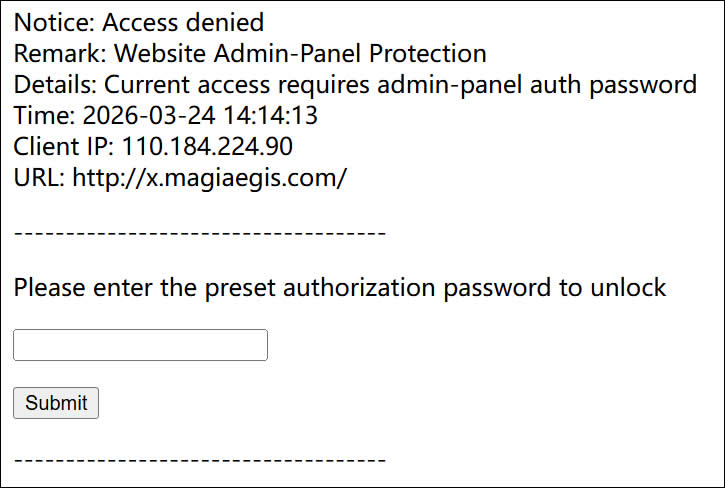
(Figure 3: Access to the backend is intercepted, requiring authorization password verification)
For convenience, you can grant overall authorization to your city (the likelihood of a hacker being in the same city as you is extremely low). As shown in the settings in Figure 2, users in Hong Kong do not require any verification to access the backend, while users outside Hong Kong must enter the authorization password.
II. Restrict the upload of dynamic script files such as PHP, ASP, and ASP.net at the physical level.
Online upload modules usually have functionality to restrict the types of files that can be uploaded, but this is often ineffective against hackers. Therefore, we need to use the "Tamper Protection" module of the "MagiAegis Defense System" to restrict the file types that can be saved at the driver level, leaving hackers with no opportunity. As shown in the settings below, writing PHP files is prohibited. Even if a hacker can upload a Trojan backdoor, it will be intercepted when saved. Most importantly, this does not affect daily management.
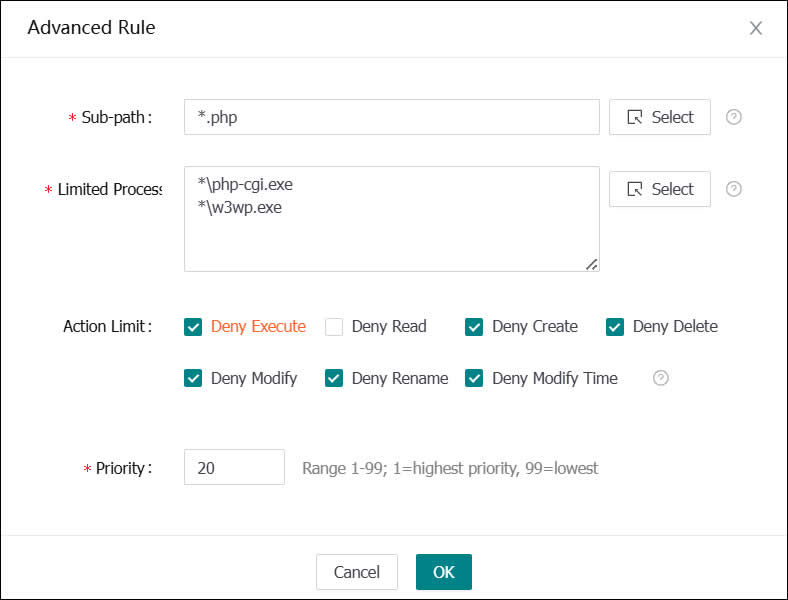
(Figure 4: Advanced rules for tamper protection, prohibiting the upload and modification of PHP files)
To make it easier for users to use the tamper protection module, the system includes built-in tamper protection rule templates for most CMS systems. You simply need to select the website path, security template, and backend address in "Add CMS Protection" and the system will automatically configure powerful tamper protection rules (as shown in the image below).
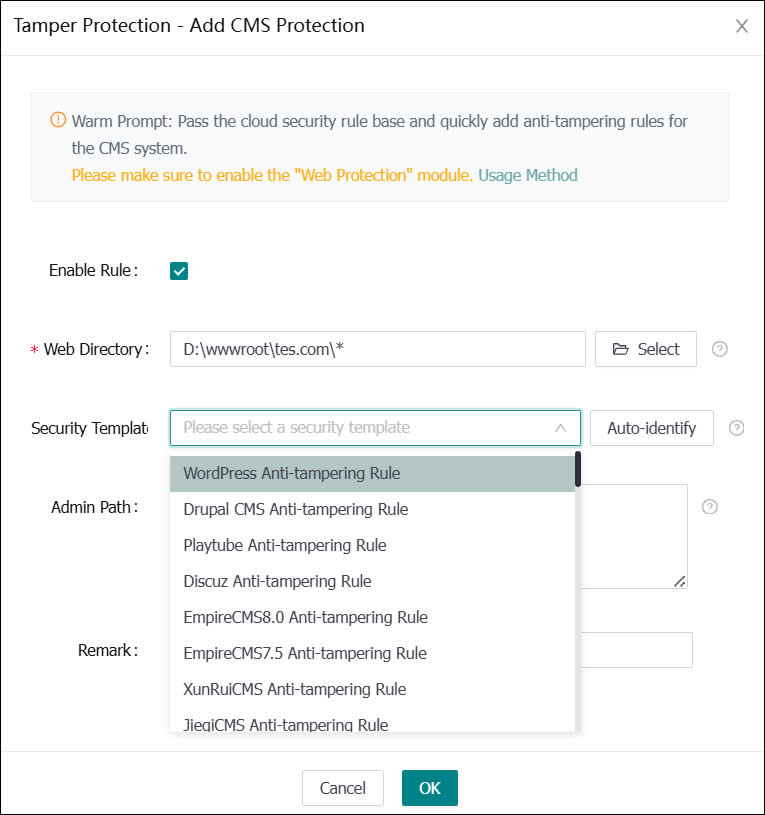
(Figure 5: Adding CMS tamper protection rules)
By implementing these two protective measures, the possibility of hackers implanting Trojan backdoors becomes zero. Isn't it simple?
Additionally, you can further enhance website security by using the "Trojan Protection" module to automatically detect and kill Trojan backdoor files, and by using the "Static Directory Protection" module to prohibit the execution of dynamic scripts in directories where uploaded files are stored (this feature is enabled by default). This addresses the destructive capabilities of existing Trojan backdoors.
If you have any other security concerns, please feel free to contact us at any time!