
Website logs are essential for administrators to analyze website operational data and traces of hacker intrusions. To reproduce hacker intrusion behaviors, it is necessary to keep complete logs of all request actions made by hackers, especially the data they upload.
As three major web servers, Apache and Nginx can record complete data logs, including GET, POST, UA, Cookie, etc. However, IIS has a fatal flaw: it cannot record POST data logs. POST data represents very core log data. For instance, when hackers upload web trojans or conduct brute-force attacks on website passwords, they send POST data. This means that when reproducing hacker intrusion behaviors, due to the lack of core POST data, it is impossible to determine the specific dangerous operations carried out by hackers, undoubtedly posing a significant obstacle to the troubleshooting process.
Relying solely on IIS cannot solve this problem, as Microsoft simply does not offer this functionality. Therefore, we need to use third-party components to achieve this. Fortunately, there is a software called "MagiAegis Defense System" that can address this issue. This software is a professional website firewall and server firewall, primarily used to prevent hacker intrusions. It features hundreds of protection modules, providing comprehensive security protection. Within its "Website Protection" module, there is a sub-module called "Request Data Snapshot" (as shown in Figure 1 below), which can record GET and POST log data, as well as other useful data for troubleshooting, such as "request time, client IP, URL address, User-Agent, Cookie," etc.
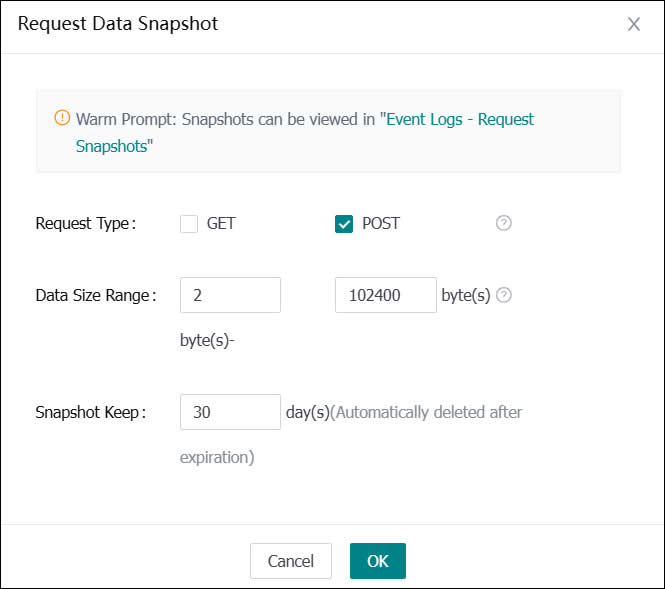
(Figure 1: Recording POST Data Logs)
As configured in the figure above, only POST data within the range of 2-102,400 bytes is recorded, and it is retained for 30 days. After saving, the system will automatically record the POST data requested by clients. To investigate hacker intrusion behaviors, one can simply filter all relevant logs by searching for the client IP, enabling a clear view of all hacker operations (as shown in Figure 2). Isn't it very simple? By just enabling this module, one can fully record IIS POST data logs.
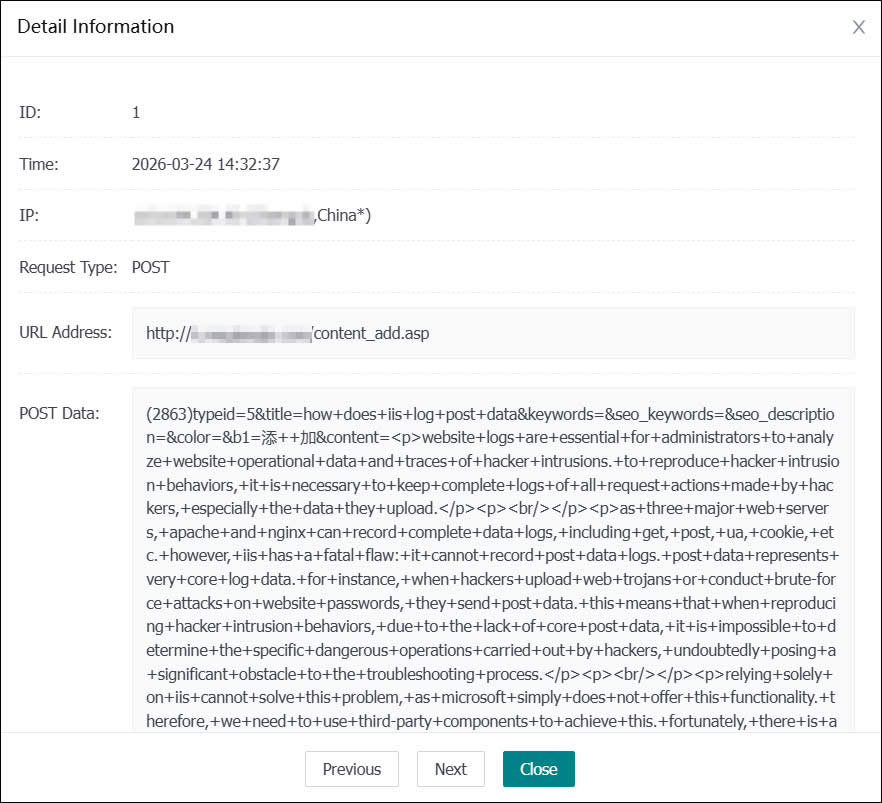
(Figure 2: Detailed POST Logs)