
Website backdoors are a type of webshell and are something that webmasters deeply detest. Once a hacker plants a backdoor into a website, they can do whatever they want. To deal with a website backdoor, you can follow the methods below.
**Method 1: Restore from a backup**
If you have a clean backup file, this issue becomes simple to handle (and is the most effective): delete the existing files and restore the clean backup.
Be sure to delete all existing files completely before restoring the clean backup. Do not use overwrite mode, as this may leave backdoor files behind.
This method is relatively straightforward and, while most effective at eliminating backdoors, does not reveal where the backdoor files were located. If you need to locate the backdoor files, you can use comparison software to compare the existing files with the backup, identify the differing files, and then manually review them to find the backdoor.
**Method 2: Audit files**
If you don’t have a backup, the only option is to audit the files. Reviewing each file individually is a huge workload, and even if you do, most administrators won’t be able to identify malicious code within them. You can speed up the process and reduce the workload by following these steps:
1. Focus on checking configuration files for any abnormal code.
2. Sort by file name and focus on newly added files.
3. Sort by last modified time and focus on files modified within the 24 hours prior to the intrusion.
4. Pay special attention to directories such as `/tmp`, `/uploads`, `/caches` (where uploaded files and temporary files are stored).
**Method 3: Scan for malware**
Manual auditing is a very painful process and should be avoided unless absolutely necessary. A simpler approach is to use dedicated antivirus software for web-based malware to scan website files and identify webshells. For example, using the "HWS Cloud Scan System" – a permanently free web-based malware scanner – can quickly detect website backdoors.
**Method 4: Audit logs**
Although web-based malware scanners can detect backdoors, no company claims a 100% detection rate. This is especially true for variant one-word backdoors embedded in normal web pages, which are nearly impossible to detect. If a website has many files, auditing each one individually is not feasible. In such cases, you can try another method: auditing the website logs.
For a hacker to operate a backdoor, they must first access it and then execute relevant commands. These operations typically use POST requests, so we only need to examine all POST request data to find clues.
**Tip:** Accessing a website generally involves GET requests, while login actions usually use POST requests. Auditing only POST request logs can greatly reduce the workload and improve efficiency.
However, there is a critical issue: by default, web servers do not record POST data, and some do not support recording POST data at all. Fortunately, this can be resolved by using the "MagiAegis Defense System" The "Request Data Snapshot" module of this system supports recording both GET and POST request data. As shown in the figure below, you can configure it to record only POST data and only when the request data size is between 5 and 102,400 bytes, reducing invalid logs.
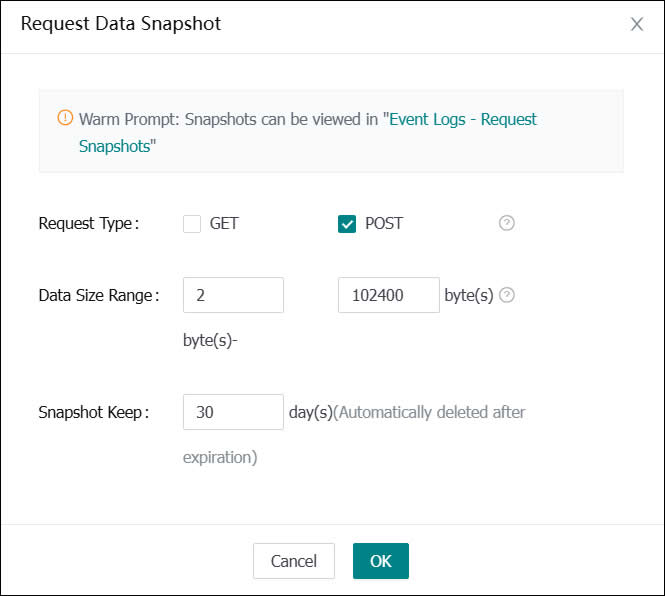
(Website log snapshot)
When a hacker re-enters the backdoor to perform illegal operations, the activity will be recorded in the snapshot log, as shown below.
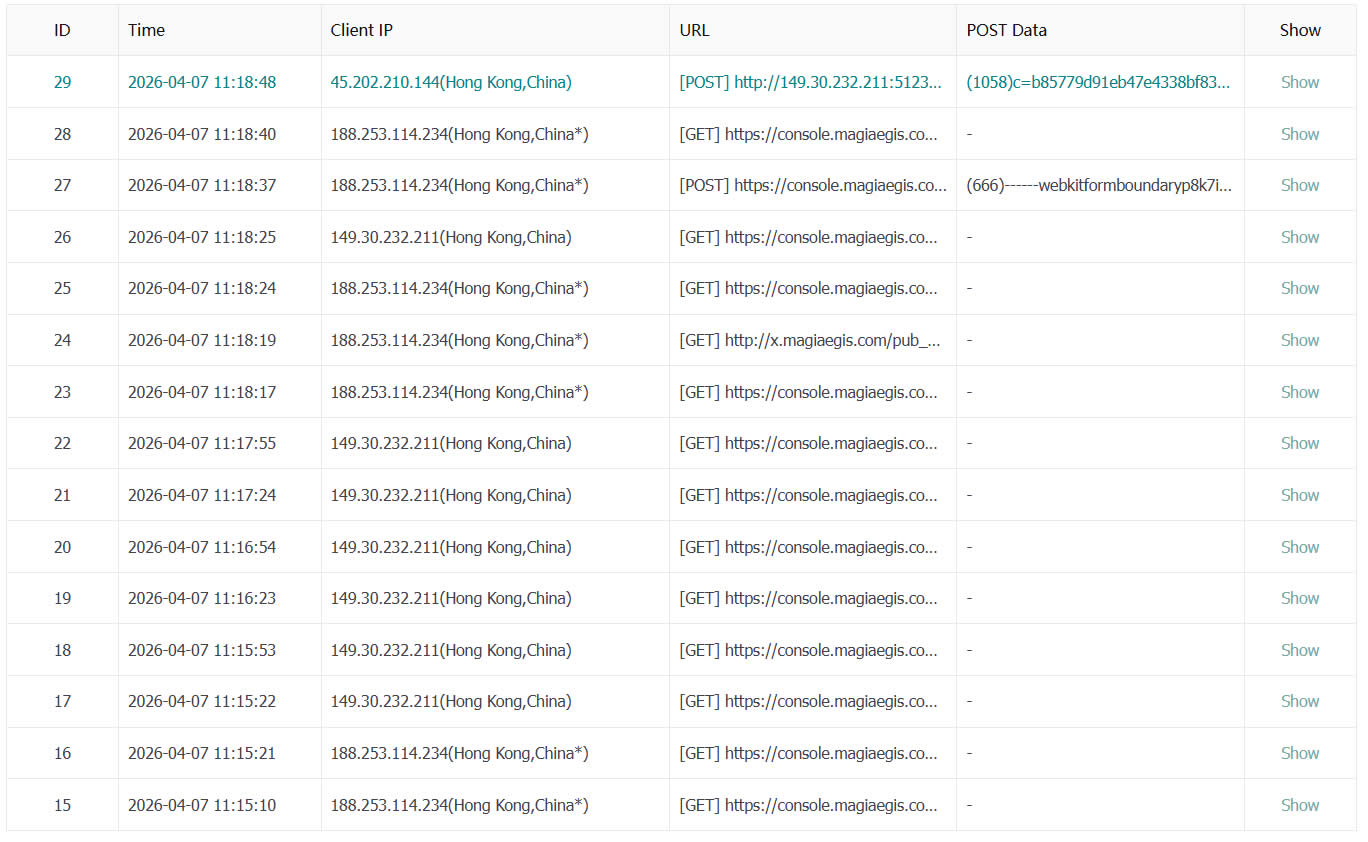
(Recorded POST request logs)
We only need to review each entry, find abnormal logs, and then identify the backdoor file, such as `addfile.asp` in the figure below.
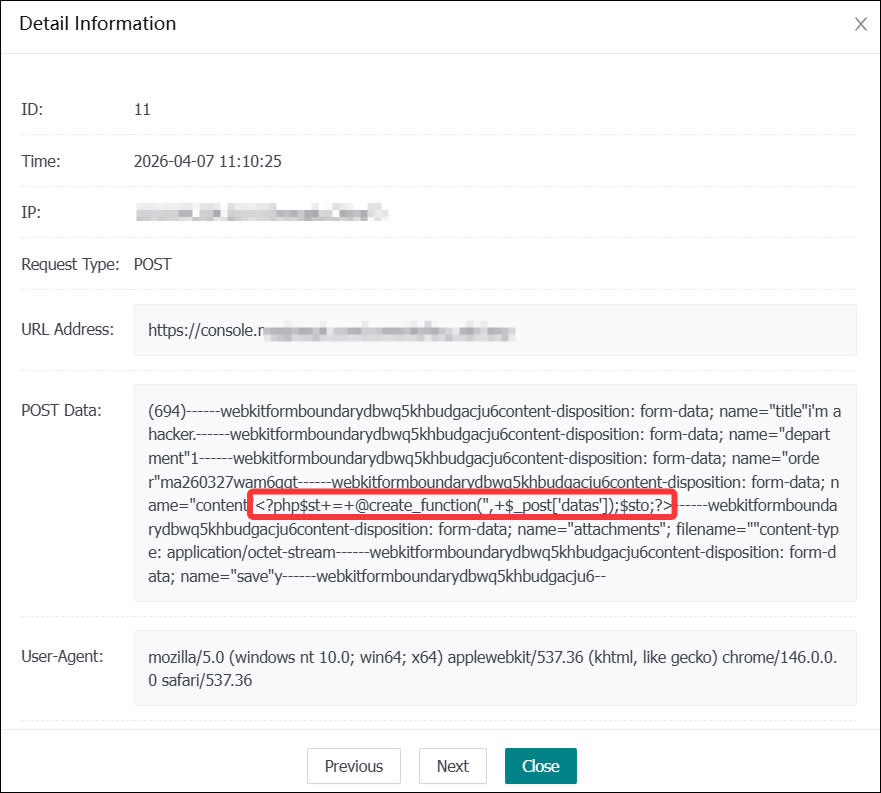
(Abnormal log discovered)
**What if nothing is found?**
If you've followed the above steps and still haven't found a backdoor file, it’s possible that the hacker did not implant malicious code into the website but instead planted malicious files on the server itself, such as cross-site intrusion or system hijacking. Handling these situations is more complex, and it is recommended to seek professional help from a security engineer at MagiAegis (www.magiaegis.com).