
After hacking into a server, most hackers will, in order to maximize their gains, deface the website, implant backdoors, inject illegal pages, embed malicious code, and so on. To protect against hacker intrusions, fixing vulnerabilities is undoubtedly the best solution. However, while the dream is beautiful, reality is harsh. Often, we have no idea where the vulnerabilities are, and even if we know where they are, we don't know where to start. Even after fixing a vulnerability, new ones may emerge. Therefore, implementing some necessary protective measures on the server is the superior approach to security protection. Anti-tampering is an unavoidable topic when it comes to defending against hacker intrusions. As long as you prevent tampering, you solve most intrusion problems. Below, we will discuss how to quickly implement anti-tampering functionality on Linux.
There are three simple ways to prevent web pages from being tampered with on a Linux server: using ACL policies, writing monitoring software for automatic restoration, and using professional anti-tampering software. Below, we will introduce the implementation methods, along with the advantages and disadvantages of each approach.
1. Using ACL Policies
This involves setting read-only permissions on files so that hackers cannot modify them. There are two ways to achieve this: one is to set the permission to 444, and the other is to set the read-only attribute. The second method is recommended because after setting the permission to 444, although it appears that only read access is granted, the file owner is not restricted and can still modify the files.
# Set read-only permissions (ineffective for the file owner)
chmod 444 -R /www/wwwroot/aa

# Set the read-only attribute
chattr -iR /www/wwwroot/aa
Advantages: Simple
Disadvantages: For websites that need to generate cache files or temporary files, the lack of write permissions can cause the website to stop running, especially for some PHP sites. Although this method is very effective at preventing tampering, if it affects website access, it is not a good approach.
2. Writing Monitoring Software for Automatic Restoration
First, you need to create a copy of the website (this copy must be confirmed to be free from tampering). Then, write a script that periodically checks the MD5 hash values of files, comparing each file in the website directory against the copy directory. If the MD5 values do not match, it means the file has been tampered with, and the script should immediately copy the file from the backup copy to overwrite it. Additionally, you can configure the script to exclude cache directories. The specific script is as follows:
#!/bin/bash
# Script to monitor files and compare MD5 hashes

# Define source directory and backup directory
SOURCE_DIR="/www/a.com"
BACKUP_DIR="/www/a.com_Backup"
EXCLUDE_DIR="caches"

# Create a temporary file to store the file list
FILE_LIST=$(mktemp)

# Find all files (excluding the cache directory) and save them to the temporary file
find "$SOURCE_DIR" -type f -path "*/$EXCLUDE_DIR/*" -prune -o -print > "$FILE_LIST"

# Iterate through the file list
while IFS= read -r file; do
    # Calculate the relative path (remove the SOURCE_DIR prefix)
    relative_path="${file#$SOURCE_DIR/}"

    # Skip empty paths (when file equals SOURCE_DIR)
    if [ -z "$relative_path" ]; then
        continue
    fi

    # Build the full path to the backup file
    backup_file="$BACKUP_DIR/$relative_path"

    # Check if the backup file exists
    if [ ! -f "$backup_file" ]; then
        echo "Warning: Backup file does not exist - $backup_file"
        continue
    fi

    # Calculate the MD5 hashes of the source file and the backup file
    source_md5=$(md5sum "$file" 2>/dev/null | awk '{print $1}')
    backup_md5=$(md5sum "$backup_file" 2>/dev/null | awk '{print $1}')

    # Compare the MD5 hashes
    if [ "$source_md5" != "$backup_md5" ]; then
        echo "Difference detected: $file"
        echo "Overwriting with backup file..."

        # Create the target directory (if it does not exist)
        mkdir -p "$(dirname "$file")"

        # Overwrite the file
        cp -f "$backup_file" "$file"

        # Check if the operation was successful
        if [ $? -eq 0 ]; then
            echo "Overwrite successful: $file"
        else
            echo "Error: Unable to overwrite $file"
        fi
    fi
done < "$FILE_LIST"

# Delete the temporary file
rm -f "$FILE_LIST"

echo "Synchronization complete"
Advantages: Simple to implement
Disadvantages: Strictly speaking, this is not truly tamper-proofing; it is merely file restoration, which has a lag. Additionally, maintaining the website later becomes more troublesome, as you need to upload files to the backup directory as well.
3. Using Anti-Tampering Software
The first two methods can both prevent tampering to some extent, but each has significant drawbacks, and they cannot be combined. Therefore, using professional anti-tampering software has become the inevitable choice. However, not just any anti-tampering software will meet your needs. Some anti-tampering tools are overly simplistic and do not allow you to set individual anti-tampering rules for subdirectories or specific files. For websites that need to generate cache files or temporary files, these tools can still cause the website to stop running due to a lack of write permissions.
The recommended solution is the MagiAegis Defense System. Its tamper protection module is highly powerful, allowing you to set robust anti-tampering rules for each subdirectory, individual file, or file type individually, meeting the anti-tampering requirements of any website. Additionally, it comes with built-in CMS anti-tampering templates, making it easy to configure complex anti-tampering rules for your website. This ensures that your website is protected from tampering without causing any side effects.
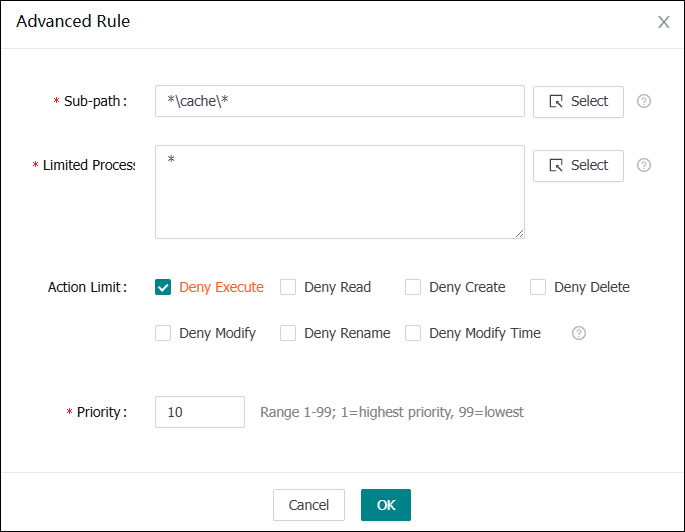
Powerful anti-tampering rules allow you to set the cache directory as writable independently
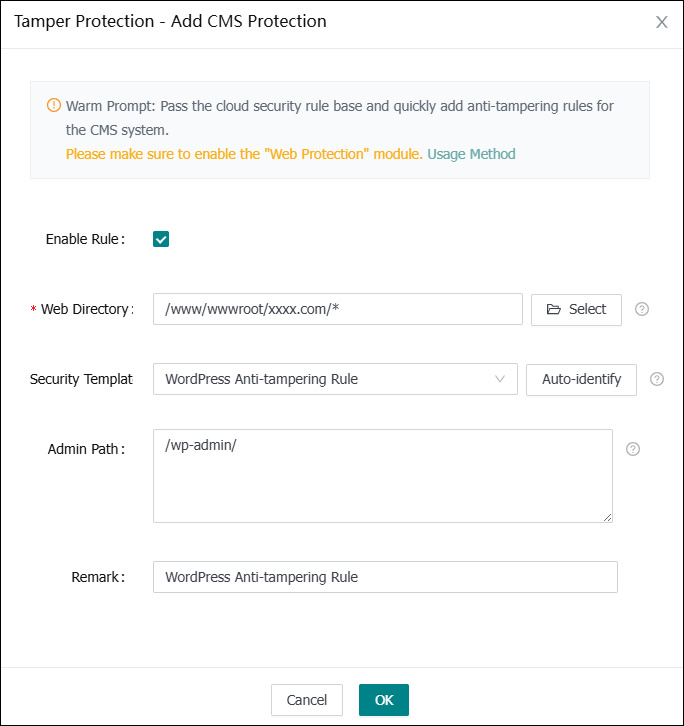
One-click addition of CMS anti-tampering rules